Quick answer
Manage household recurring expenses without the stress. Learn how to track shared family subscriptions, set approval rules, and stop surprise charges.
Managing subscriptions for one person is a chore; managing them for an entire household is a full-time job. Between Netflix profiles, Disney+ bundles, educational apps for the kids, and that gym membership no one uses, family recurring expenses tend to grow in the dark.
Stay Updated with Subtrakr
Sign up to our newsletter to get updates about Subtrakr and valuable insights about subscriptions and recurring expense management.
Family subscription management is the process of centralizing all household recurring costs - streaming, software, utilities, and memberships - into a single visible dashboard. By establishing shared visibility, a clear "subscription owner," and a "check-before-buy" rule for trials, families can eliminate surprise charges and save hundreds of dollars annually.
Why do family subscription stacks grow faster than expected?
The "subscription creep" hits families harder because there are multiple "buyers" under one roof. When everyone has the authority to click "Start Free Trial," the household budget suffers from death by a thousand cuts.
Common reasons for family subscription bloat include:
- Redundant Services: Mom has a Spotify solo account, but Dad just signed up for YouTube Premium, which includes music.
- The "Trial" Trap: A child starts a free trial for a mobile game on an iPad; thirty days later, a $14.99 monthly charge begins appearing on a linked credit card that no one checks.
- Forgotten Educational Tools: Apps purchased for a specific school year or hobby often sit idle for years while the billing continues.
Without a centralized system, these expenses become "invisible" because they are spread across different bank accounts and app store IDs.
What are the rules for shared visibility?
To get a handle on family spending, you must move from individual silos to a shared household view. Transparency is the best defense against subscription overload and its true costs.
1. One Source of Truth (The Master List)
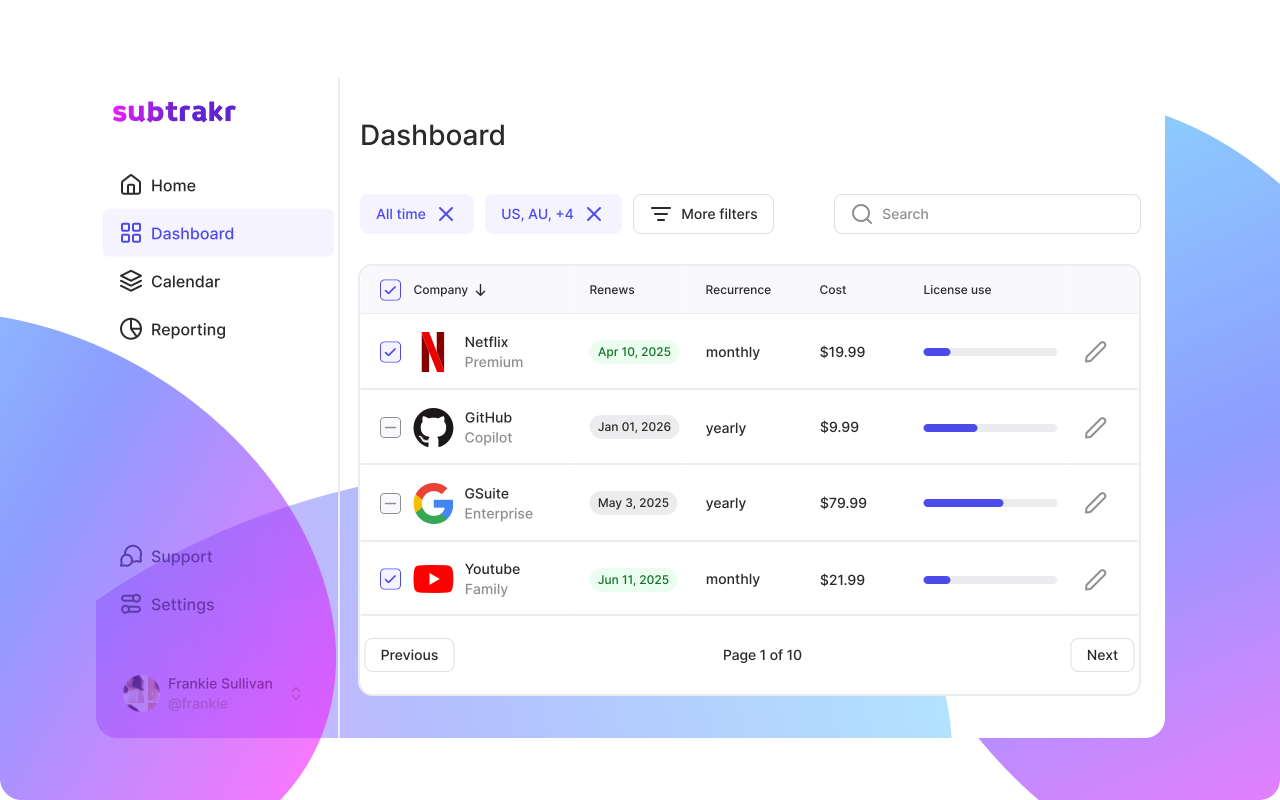
Whether you use a dedicated app like Subtrakr or a subscription tracker spreadsheet, all recurring bills must live in one place. This list should include:
- The service name.
- The monthly/annual cost.
- The renewal date.
- The person who "uses" it most.
2. Designate a "Subscription Owner"
Every household needs a CFO, Chief Financial Officer. This person isn't necessarily the one paying every bill, but they are the one responsible for the audit loop. Their job is to review the master list once a month and ask: "Are we still using this?"
3. Use a Shared Renewal Calendar
Surprises happen because billing dates are unpredictable. Set up a shared digital calendar (Google or iCloud) and input every major renewal date.
Pro Tip: Set a notification for 7 days before an annual renewal. This gives you time to discuss whether to keep the service before the big charge hits.
How do you set approval rules for new subscriptions?
"Kid-proofing" your budget doesn't just mean locking down the iPad with a password; it means setting cultural rules for how money leaves the house.
The "Ask Before You Click" Policy
Implement a rule that no new trial or subscription is started without a quick "Value Verdict."
- For Kids/Teens: They must explain why the app is needed and how long they plan to use it.
- For Adults: Check if a family plan version of an existing service already covers the need.
The Trial Log System
If a family member starts a free trial, it must be logged immediately. Most trials are designed to be forgotten. By treating a "free" trial as a "future expense," you shift the mindset from "it's free" to "this will cost us $120/year if I don't act."
Step-by-Step Setup: The Family Subscription System (Time required: 30 minutes)
Follow these steps to build your household defense system:
- Gather the Data: Spend 15 minutes checking bank statements, PayPal, and "Subscriptions" settings on all iPhones/Androids in the house. (Use our guide on how to find all your subscriptions for help).
- Consolidate to Family Plans: Look for individual accounts that can be merged. Switching three individual $10 accounts to one $17 family plan is an instant win.
- Establish the "Landing Zone": Choose where your tracking lives. If you prefer a manual approach, use A Simple Budgeting Hack for Families and Freelancers to categorize these bills.
- Set the Calendar: Input the 5 most expensive recurring bills into your shared calendar immediately.
Monthly Family "Subscription Meeting" Checklist
You don't need a formal boardroom meeting, but a 5-minute status check on the first Sunday of the month can save a fortune. Use this checklist:
- The "Usage" Audit: Did anyone watch [Streaming Service X] this month? If not, rotate it out.
- The Price Check: Did any bills go up? (See How to handle price increases).
- The "Forgotten" Filter: Check for any "zombie" subscriptions (apps for hobbies we've quit).
- The Upcoming Annuals: Are any large annual fees coming up in the next 30 days? Do we have the cash set aside?
Common Mistakes in Family Subscription Management
Assuming "Family Sharing" is always cheaper
Sometimes, two individual "Basic" plans are cheaper than one "Premium Family" plan if you don't need the extra features.
Ignoring "In-App" Subscriptions
Apple and Google make it very easy for kids to subscribe to gems or pro versions inside games. Check the "Purchases" history, not just the "Subscriptions" tab.
The "I'll Cancel It Later" Lie
Never start a trial without a cancellation strategy. If you don't want to keep it, cancel it the same day you start the trial - most services let you keep access until the period ends.
FAQ
How can I prevent my kids from buying subscriptions on their devices?
Use "Ask to Buy" on Apple devices or "Purchase Approvals" on Google Play. This sends a notification to the parent's phone to approve or decline any transaction.
Is it better to pay monthly or annually for family plans?
Annual plans usually offer 15-20% savings. For services you know the family will use all year (like Amazon Prime or Disney+), go annual. For niche services, stay monthly so you can cancel easily. See Annual vs Monthly Break-Even Guide for more.
How do I track subscriptions paid by different family members?
Use a shared tool like Subtrakr where multiple users can see the same dashboard, or maintain a shared cloud spreadsheet where everyone is required to log their recurring hits.
Next Action
Open your mobile app store right now, go to "Subscriptions," and show your partner or spouse exactly what you are currently paying for. Transparency starts today.