Quick answer
Recurring subscriptions and bills can quietly drain your wallet if you're not paying attention. From streaming services to software licenses, those monthly charges add up (and let's be honest, we all forget a few). Luckily, there are apps that help you track all your recurring expenses in one place and even save you money by canceling unwanted subscriptions or negotiating lower bills.
Recurring subscriptions and bills can quietly drain your wallet if you're not paying attention. From streaming services to software licenses, those monthly charges add up (and let's be honest, we all forget a few). Luckily, there are apps that help you track all your recurring expenses in one place and even save you money by canceling unwanted subscriptions or negotiating lower bills. Below we compare five of the best apps for wrangling those recurring costs – Rocket Money, Mint, YNAB, Truebill, and Trim – and introduce Subtrakr, a rising star (currently in early access) aimed at giving you extra visibility and control over your subscription spending. We'll break down how each app works, key features, pros and cons, and pricing, so you can decide which fits your needs.
Stay Updated with Subtrakr
Sign up to our newsletter to get updates about Subtrakr and valuable insights about subscriptions and recurring expense management.
For the full management workflow these tools plug into—inventory, central tracking, renewal reminders, and quarterly audits—see Subscription Management in 2026: The Complete Guide.
If you are specifically choosing between these two tools, see the detailed head-to-head comparison: Subtrakr vs Rocket Money: Which Subscription Tracker Fits Your Style?.
(Psst: We're keeping this casual and jargon-free – consider it friendly advice from one budget-conscious person to another.)
Rocket Money (formerly Truebill)
How it works: Rocket Money is like a personal finance assistant that specializes in finding and trimming your recurring expenses. After you connect your bank or credit card accounts, the app automatically detects your subscriptions and bills and puts them in one dashboard. It also includes budgeting tools to track spending and even offers to negotiate your bills (like cable or phone contracts) to save you money. Rocket Money was originally known as Truebill, so you might see those names used interchangeably – it's the same app under the hood, just with a new name and expanded features.
Key Features:
Subscription Tracker: Automatically identifies your recurring charges and subscriptions so you can see all your monthly and yearly subscriptions in one place. If you spot something you don't want, you can cancel it through the app (Premium members can have Rocket Money cancel it for you with a click).
Bill Negotiation: Rocket Money's team will negotiate with service providers on your behalf to reduce your bills (think cable, internet, cell phone). You only pay a fee if they secure you a discount – typically a cut of the first year's savings (about 35–60%). If they can't save you anything, you pay nothing for that service.
Budgeting & Insights: Track your spending across categories and set budgets/goals for each. The app automatically categorizes transactions and alerts you when you're nearing your budget limits. It even shows your spending allowance and offers personalized insights to help you save.
Credit Score & Net Worth: As a bonus, Rocket Money lets you monitor your credit score and see a snapshot of your net worth by aggregating your assets and debts in one view. It's a bit of an all-in-one financial dashboard.
Pros:
All-in-One Convenience: Combines subscription management, budgeting, and bill reduction in one app. It's like having a budget tracker and a savings concierge together, which many users love ("it's like having a personal accountant," one review said).
Actually Saves Money: Many users report real savings – Rocket Money will find forgotten subscriptions and negotiate bills you might not have had time to deal with. For example, one user saved ~$175 on a SiriusXM subscription and got her AT&T bill reduced using the app.
Bill Negotiation with No Upfront Cost: There's no charge to try the negotiation feature; you only pay a portion of what you save if they succeed. That makes it a no-risk way to potentially lower your bills.
Available on Mobile & Web: Rocket Money has well-rated apps for iOS and Android, plus a web interface. So you can manage your money on the go or on a computer, whatever's easiest.
Cons:
Only available to users in the United States: It does not support international or EU-based bank accounts, and its financial services are designed specifically for the U.S. market.
Premium Features Cost Extra: While basic subscription tracking and budgeting are free, the premium perks (like having the app cancel subscriptions for you, unlimited budget categories, real-time account sync, etc.) require a paid subscription. Some of the most useful functions are behind that paywall.
Subscription Fee for Premium: The Premium plan isn't free – it uses a "pay what's fair" model, which typically ranges from about $3 up to $12 per month. So you're essentially paying a subscription to manage your subscriptions (the irony isn't lost on us!). The cost is reasonable for heavy users, but it's still an added monthly expense.
Success Fee on Savings: If Rocket Money negotiates a bill down, they charge around 40% of the first year's savings as their fee. That's a sizable chunk. It's fair since you keep the other 60% and all future savings, but some frugal folks might wish the cut was smaller.
Account Linking Required: Like most finance apps, you need to connect your bank/credit accounts for it to work its magic. If you're uncomfortable with that, you won't get much value from Rocket Money's automation.
Pricing: The basic Rocket Money app is free to download and use. Free features include subscription tracking, basic budgeting, and credit score monitoring. The optional Premium plan is user-priced (you choose an amount, usually ~$7–14/month, up to $12 in practice), which unlocks features like subscription cancellation concierge, unlimited categories, custom budget options, and priority support. Rocket Money also makes money via its bill negotiation service (they take a percentage of what they save you, as noted above). There's a 7-day free trial for Premium, and you can cancel Premium anytime. In short: you can do a lot for free, but if you want hands-off cancellation and more advanced insights, you'll end up paying a few bucks a month for Premium.
Mint
How it works: Mint is the OG of budgeting apps. It's been around for ages and made a name for itself by letting you see all your finances in one place – bank accounts, credit cards, bills, investments – for free. Mint helps track your spending by category, alerts you to upcoming bills, and yes, it has a subscription tracking feature to highlight your recurring expenses. It's more of a spending tracker and budget planner than a bill negotiator, but it can still help you save by keeping you on top of where your money is going. Important note: Intuit (Mint's parent company) announced that Mint would be discontinued and folded into Credit Karma's app by 2024. As of now, Mint's core features were still active for existing users, but going forward you may need to use an alternative. We'll cover it here because it's historically one of the best, but keep the sunset in mind.
Key Features:
Account Aggregation: You link your various financial accounts to Mint, and it pulls in your transactions and balances. This gives you a dashboard of all your finances – checking, savings, credit cards, loans, investments – in one app. It updates automatically so you can track net worth and cash flow easily.
Budgeting & Spending Insights: Mint automatically categorizes your spending (groceries, rent, eating out, etc.) and lets you set budgets for each category. It provides charts and graphs of your spending habits, plus personalized insights to highlight areas you might cut back. You'll get alerts if you're over budget or have unusual spending.
Bill & Subscription Tracking: Mint includes a bill tracker that detects your recurring bills and subscriptions, and can send you due date reminders or alerts for things like bill increases. Recurring subscription charges are flagged so you can see all the services you're paying for monthly.
Credit Score & More: The app gives you free access to your credit score (TransUnion VantageScore) anytime. It also has an investment tracker to view your portfolios and compare against benchmarks, which is handy if you have brokerage or retirement accounts connected.
Pros:
Totally Free (with Ads): Mint's core functionality has been free to use, which is a huge plus for budget-conscious users. You get a lot of value (multi-account sync, budgeting, credit score, subscription monitoring) without a monthly fee – Mint makes money by showing you tailored offers for credit cards, loans, etc., not by charging you.
Holistic View of Finances: It's great for seeing the big picture of your money. Few apps combine budgeting, investment tracking, bill reminders, and credit score like Mint does. If you want one app to replace your spreadsheets and show all your accounts, Mint shines.
Easy Budgeting Tools: Mint's budgeting interface is beginner-friendly. Automatic categorization and visuals make it easy to understand your spending. The app can even project your spending trends and show how you stack up to average consumers, which some users find motivating (or scary!).
Subscription Tracking Included: Mint's subscription detection is built-in and free. It will list out your recurring charges so you can quickly identify anything you forgot about or need to cancel – a nice feature to help trim the fat from your budget.
Cons:
Being Discontinued: The elephant in the room is that Mint is being shut down and merged into Credit Karma's platform. This means future support and updates for Mint are ending. If you're a new user, you may not be able to sign up, and existing users will be encouraged to migrate. It's a bummer because Mint has been beloved, but Intuit's shifting focus elsewhere.
Ads and Offers: Because it's free, Mint will sprinkle in product offers (credit cards, bank accounts, etc.) that it thinks might interest you. Some people find this annoying or too "ad-heavy." The offers are fairly easy to ignore, but it's the trade-off for free access.
Occasional Sync Issues: As with any aggregator, Mint sometimes struggles to sync with every bank or might lose connection and need you to re-authenticate. These hiccups can be frustrating if an account stops updating. The overall reliability is decent but not flawless.
No Bill Negotiation/Cancellation Service: Unlike Rocket Money or Trim, Mint won't call your cable company or cancel subscriptions on your behalf (unless you had Mint's short-lived Premium service on iOS, which used a partner to cancel things). The free version will alert you to subscriptions, but you must cancel them yourself. Mint is more passive – it tells you, but doesn't take action for you.
Pricing: Mint's basic app is free. All the core features (account syncing, budgets, subscription tracking, credit score, etc.) cost nothing, supported by ads and partner offers. In late 2022, Intuit introduced Mint Premium at $4.99/month (initially iOS-only) which offered an ad-free experience, subscription cancellation through a Billshark integration, and some extra charts. However, given Mint's discontinuation, Mint Premium is also being phased out. So as of now, there isn't an active paid version to subscribe to even if you wanted to – Intuit is directing users to the free Credit Karma app for similar features going forward. Bottom line: Mint was a freebie, and if you can still use it, it won't cost you anything (just be aware it's on its way out).
YNAB (You Need A Budget)
How it works: YNAB isn't just an app – it's a whole budgeting philosophy. If Rocket Money and Trim are about automating savings, YNAB is about teaching you to be mindful of every dollar. It uses zero-based budgeting, meaning you allocate every dollar of income to something (bills, goals, etc.) so you're intentional with your money. YNAB connects to your accounts too, but the emphasis is on manual involvement: you review and approve transactions, move money between categories, and really engage with your budget. It's a bit like the personal trainer of budgeting apps – it expects you to show up and do the work, but the payoff is improved finances and less money stress. Unlike the others on this list, YNAB doesn't directly find or cancel subscriptions for you, but it will help you plan and budget for those recurring expenses so they don't catch you off guard.
Key Features:
Zero-Based Budgeting Method: YNAB's framework has you give every dollar a job. When you get income, you assign it to spending categories that you customize (e.g., Rent, Groceries, Netflix, Savings, etc.). The goal is to plan proactively – you're always budgeting current money for future expenses, including less frequent ones like insurance or holidays. It enforces living on last month's income as you build buffer.
Goal Tracking: You can set savings goals or debt payoff goals in YNAB, and it will track your progress and inform how much you need to budget each month to hit the target. This ties into their philosophy of breaking big expenses into monthly "true expenses." It's great for planning for irregular bills or big purchases bit by bit.
Transaction Sync + Manual Flexibility: YNAB can link to 14k+ banks for automatic transaction import, or you can enter transactions manually (some hardcore users do it like a checkbook). When transactions import, you categorize and approve them – keeping you aware of every expense. Mobile apps let you enter spending on the fly too. It's a mix of automation and manual control.
Reports and "Age of Money": YNAB provides spending reports and a unique metric called "Age of Money" – basically how long your dollars sit before you spend them, with a higher age meaning you're getting ahead financially. It encourages you to reach an Age of Money of 30+ days (meaning you're using last month's money to pay this month's bills, a sign of breaking the paycheck-to-paycheck cycle).
Pros:
Highly Effective Budgeting System: People who stick with YNAB often save a lot of money and break bad spending habits. YNAB boasts that new users save ~$600 in the first two months and over $6,000 in the first year on average by following the method. It's not magic – it's because you become very intentional with money. But those are real, impressive results.
Extensive Education & Support: YNAB offers tons of free workshops, tutorials, and guides to help you succeed. There's a huge community (subreddit, forums) of fans sharing tips. The company has a helpful ethos – no ads, no selling your data – since it's subscription-funded. Plus, their support is known to be responsive and friendly.
Ad-Free, Privacy-Focused: YNAB is a paid product, which means no third-party ads or product pitches in the app. They don't mine or sell your financial data. If you value privacy and a clean, focused experience, this is a big plus over free ad-supported apps.
Great for Couples/Shared Budgeting: YNAB allows multiple devices/users on the same budget (you can even have up to 6 people on one subscription via YNAB Together for families). It's really handy for couples trying to budget jointly – both can add transactions and see the budget update in real time, avoiding miscommunications about money.
Cons:
Steep Learning Curve: YNAB's approach can be intimidating at first. The zero-based method and all the manual steps are a lot of work initially. New users often struggle with it and it takes a month or two to really "get" the flow. If you're looking for a quick, hands-off fix, YNAB will feel like a chore – it demands regular attention and adjusting categories ("rolling with the punches") each month.
Premium Price: This is one of the priciest budgeting apps. YNAB costs $14.99/month or $109/year – substantially more than competitors like Mint (free) or Simplifi (~$48/year). There's no free tier beyond a 34-day trial. For tight budgets, paying ~$100 a year to budget might feel counterintuitive (though many fans swear it pays for itself and then some).
No Bill Negotiation or Automation Perks: YNAB is laser-focused on budgeting and does not offer the automatic savings features others do. It won't identify a forgotten subscription or lower your cable bill for you – that's on you to handle. If you want an app that actively cancels or negotiates things, YNAB isn't it. It's a trade-off for privacy and philosophy, but worth noting in this company.
Limited Investment Tracking & Extras: Unlike some personal finance apps, YNAB doesn't have robust investment or net worth tools (it's mainly cash-flow budgeting). You also won't get credit score monitoring or fancy extras here. It sticks to the budgeting lane. So you might need a separate app or method to track investments or long-term planning.
Manual Maintenance Required: Even with bank sync, YNAB works best if you are actively managing it – categorizing transactions, reconciling accounts, moving budget amounts when needed. It's not a "set and forget" tool. If you fall behind on updating it, your budget can become messy or inaccurate, which defeats the purpose. It needs a few minutes of love routinely.
Pricing: YNAB is subscription-only. After a free 34-day trial, it's $14.99 per month or $109 per year if paid upfront (which comes out to ~$9/month). There is a nice perk: college students get 12 months free with proof of enrollment. YNAB occasionally offers discounts around the holidays, but generally those are the prices. It's certainly an investment – however, if YNAB's method helps you save hundreds a month, it can be well worth it. Just be sure you're ready to commit to using it; otherwise, it's an expensive icon on your phone.
If you are deciding whether to run YNAB alone or pair it with a dedicated recurring-expense tracker, read Subtrakr vs YNAB: Subscription Tracking vs Budgeting and How They Work Together.
Truebill (Now Part of Rocket Money)
How it works: Truebill made a splash a few years back as one of the first apps to tackle the "hidden money leaks" in our finances. It worked very similarly to what we described for Rocket Money – because Truebill became Rocket Money. (Rocket Companies acquired Truebill and rebranded it as Rocket Money in 2022.) Still, many people recognize the Truebill name, so we're giving it a section here. Essentially, Truebill was a subscription tracker and bill negotiator app: you'd connect your accounts, it would find your recurring charges, help you cancel the ones you didn't want, and negotiate with service providers to cut your bills. All those features carried over to Rocket Money. If you download Rocket Money today, you're getting Truebill's DNA with some extra budgeting features on top.
Key Features (when it was Truebill):
Subscription Management: Truebill automatically identified your subscriptions and recurring payments, much like Rocket Money does now. It gave users a clear list of their subscriptions (from Netflix to gym memberships), and you could cancel unwanted ones through the app. This was one of Truebill's hallmark features – helping people dump unused subscriptions and stop paying for things they forgot about.
Bill Negotiation: Truebill's team would negotiate bills for cable, internet, phone, etc., aiming to save you money on those services. They worked on a success fee model – if they lowered your bill, they'd take a percentage of the annual savings as a fee (the range was roughly 30-40%). Many users appreciated not having to haggle with Comcast or AT&T themselves!
Budgeting & Balance Alerts: In later updates, Truebill added budgeting tools and spending insights. It wasn't as full-featured as Mint or YNAB in budgeting, but it could track your spending by category and send alerts for things like low account balance, large transactions, or upcoming bills. A handy add-on, even if budgeting wasn't Truebill's main focus.
Smart Savings Feature: Truebill allowed users to set up automated deposits into a Smart Savings account. You could let the app determine small safe-to-save amounts to pull from your checking (or set a fixed amount) to build an emergency fund. This money could be withdrawn anytime. It was a nice little perk to painlessly save in the background.
Pros:
Proven Money-Saver: Truebill gained popularity because it tangibly saved people money. As mentioned earlier, users have saved on everything from TV subscriptions to wireless bills. Truebill would comb through and find subscriptions you might have forgotten (42% of people have at least one they forgot, according to one survey) and help you cancel or negotiate them down. For example, one Truebill user found two forgotten subscriptions and saved nearly $175 on SiriusXM, plus got her AT&T bill reduced. Those are real wins.
Easy to Use: The interface was user-friendly – you could see all your recurring charges at a glance and take action with a few taps. It simplified a chore (tracking subscriptions & calling companies) that most of us procrastinate on. Truebill basically did the boring work for you.
Same Benefits as Rocket Money: Since Truebill is now Rocket Money, all the pros listed under Rocket Money apply here: the convenience of having someone cancel subscriptions for you, no charge unless you save, etc. Rocket Money even expanded on Truebill by adding more robust budgeting and credit score tracking, so the service has only gotten better.
Free to Start: Truebill had a free version that let you use the core features (subscription tracking, basic alerts). You only paid for premium if you wanted extras like unlimited budgets or the cancel-for-me concierge. This lowered the barrier to trying it out – you could see potential savings first, then decide if Premium was worth it.
Cons:
Nowhere to Sign Up (as Truebill): Since the rebrand, Truebill isn't a standalone app anymore. If you search for Truebill, you'll be directed to Rocket Money. This isn't really a con of the service itself (Rocket Money is Truebill 2.0, essentially), but if someone is set on "Truebill," they might be confused. Just know it's the same service, new name.
Premium Upsell: Truebill Premium (now Rocket Money Premium) costs money and some features require it. Cancelling subscriptions through the app, for instance, is a premium feature – free users would still have to do the actual cancelling themselves. Also, things like custom categories or syncing balances more frequently were Premium-only. So, while you can use it free, you might feel nudged to pay for full convenience.
Cut of Savings Fee: Truebill's bill negotiation isn't completely free – it takes a percentage of your savings if successful. This fee (around 30-40%) can feel high. Paying, say, $40 to save $100 means you still come out ahead $60, which is good, but it's money you don't keep. Some users have complained especially if the savings turned out smaller than expected but they owed the fee upfront.
Privacy/Account Access: As with any of these services, you need to link your financial accounts for it to work well. Truebill uses bank-level encryption and was read-only (they use Plaid, so they don't store your login info), but if you're uncomfortable with that, it's a barrier. Also, handing over some control (like letting them cancel stuff or negotiate) means trusting the service.
Pricing: Truebill's pricing model was essentially identical to Rocket Money's. The basic app was free to use for subscription tracking, spending monitoring, and bill negotiation requests (no upfront cost). The Premium subscription was offered on a sliding scale – users could choose to pay between $3 to $12 per month for Premium features (with some default suggestions like $4, $5, or $8; they let you pick what you felt was fair). If you paid annually, it was a bit cheaper (around $36-$48/year). Premium included the subscription cancellation concierge, unlimited budgets/categories, and priority support. For bill negotiations, Truebill would take a success fee (~40% of the first year savings), similar to Rocket Money. In summary: nowadays, you'll just get a Rocket Money subscription – but the costs and setup are the same as Truebill had. Free to try; pay what you want for full service.
Trim
How it works: Trim is like your frugal friend who loves haggling with companies on your behalf. It's a service (primarily web-based) that focuses on cutting your recurring expenses automatically. You connect your accounts, and Trim will scan for recurring charges (subscriptions, bills) just like the others – but its real power is that it will then negotiate or cancel those charges for you, mostly behind the scenes via text or dashboard. Trim can negotiate things like your cable bill, internet, insurance, bank fees, and even request interest rate reductions on credit cards in some cases. It also identifies your subscriptions and can cancel them (for premium users) or send you instructions to cancel. Think of Trim as a money-saving assistant bot: it alerts you via text or email about ways to save and does the legwork if you give the go-ahead. It doesn't have a fancy mobile app or budgeting features – it's more of a minimalist tool aimed purely at saving you money on recurring costs.
Key Features:
Bill Negotiation: Trim's flagship feature is negotiating bills. It works with many major providers (Comcast, AT&T, Verizon, Spectrum, etc.) to get you lower rates on cable, phone, internet, and even can try to reduce APR on credit cards or knock off bank fees. You either upload your latest bill or just let Trim fetch info after connecting accounts, and Trim's team will attempt to score you a discount or find promotions.
Subscription Monitoring (and Cancellation): Trim flags your recurring subscriptions and gives you a list of them. If you see something you don't want, Trim can help cancel it. For some subscriptions, Trim can do it automatically if you have Premium (you might send a text like "Cancel Hulu" and they'll handle it). If you're on the free plan, they'll at least provide info on how to cancel. It's a nice safety net to avoid paying for things you no longer use.
Automated Savings & Debt Payoff: Trim offers a Simple Savings account where it can automatically transfer small amounts from your checking to a savings account (held with an FDIC-insured partner bank). The first $2,000 in that account earns 4% interest as an extra perk. Trim also has a feature called TrimPay that helps you automate credit card payments to pay down debt faster by scheduling extra payments right after paychecks.
Spending Alerts & Insights: While Trim isn't a full budgeting app, it does have some basic finance tracking. It can send you alerts for things like a low balance, large transactions, or remind you if a bill increased. There's a dashboard where you can see a breakdown of your spending by category over time. It's simpler than Mint's charts, but it gives a snapshot to help spot where you could cut back.
Pros:
Hands-Off Savings: Trim truly puts things on autopilot to save you money without you having to call or negotiate. For busy or less assertive people, this is gold. It will sift through years of account data to find recurring charges you might not notice, and it claims it can often shave around 30% off bills like cable or phone through negotiations. You basically set it and let Trim go to work finding savings.
No Upfront Cost for Results: You can use Trim's basic features for free, and even the bill negotiation has no upfront fee – you only pay if they secure you savings (as a percentage of what you save). That performance-based model means if Trim can't save you anything, you're not out of pocket. It's a win-win structure in theory.
Automates the Boring Stuff: Trim will handle annoying tasks like waiting on hold with customer service or sending cancellation emails. It even communicates via SMS or Facebook Messenger if you want, making it very low-effort for the user. You just get a message like "We found a $7.99 subscription to XYZ, do you want to cancel it?" and you can reply "Yes" and be done. It's convenience at its finest for trimming expenses.
Security and Privacy Focus: Trim uses read-only access (via Plaid) and bank-level encryption to access your accounts, and it has two-factor authentication for your login. They also don't sell your data to third parties. Since their money comes from either premium subscriptions or the cut of savings, they're not in the business of monetizing your personal info, which is reassuring.
Cons:
No Dedicated Mobile App: Trim is primarily used through a web dashboard or even text messages – there's no smartphone app to install. Some people might not mind (fewer apps cluttering your phone!), but others might find this inconvenient in an age where we expect an app for everything. You'll be interacting via browser or SMS.
Limited Financial Planning Features: Trim is not a budgeting app or a comprehensive finance tracker. It's very laser-focused on cutting costs. If you already meticulously track your expenses, Trim's insights might feel too basic. It won't replace a full budgeting tool; it's more of a niche add-on for savings.
Premium Subscription Cost: While you can do a lot free, Trim has a Premium plan for $99/year. Premium gives you additional services like automatic subscription cancellation, medical bill negotiation, financial coaching, and the high-yield savings account access. $99/year is a bit steep if you're not going to use all those features – especially since, theoretically, you could just pay the success fees individually when they negotiate bills. It's only worth it if you have many bills to negotiate (and thus would exceed $99 in fees) or you value the other perks.
Success Fees Billed Upfront: One complaint some users have is that when Trim does save you money on a bill, they charge their fee immediately for the expected annual savings. For example, if they cut your cable bill by $10/month (= $120/year saved) and the fee is 15%, they'll charge you ~$18 right away, even though you realize that $120 over the next 12 months. It's logical but can feel like an annoying upfront hit to your cash flow.
Bank Connection Required: Trim only works with banks/credit accounts that connect via Plaid. If your financial institution is obscure or doesn't play nice with Plaid, Trim might not work for you. And of course, if you're not comfortable linking accounts, Trim becomes far less useful (they can't analyze your spending if you don't connect). There's also the fact that Trim operates mainly in the U.S. – international users likely can't use it.
Pricing: Trim offers a free basic service that includes subscription monitoring, simple spending analysis, and even initiating bill negotiations. For bill negotiation, the standard success fee is 15% of the first year's savings on that bill (some sources indicate it could be up to 33% for certain negotiations now – it may depend on the type of bill or updated policies, but 15% was a common fee). That fee is only charged if they successfully save you money, and it's charged upfront for the year of savings. In addition, there's Trim Premium at $99/year (after a 14-day free trial). Premium includes all the bill negotiation without needing to pay percentage fees (so if you have a lot of bills, $99 flat could be cheaper), automatic subscription canceling, the 4% savings account, debt payoff planning, and financial coaching via email. Worth noting: Trim was acquired by OneMain Financial in 2021, and as of 2025 they were integrating some services – e.g., some OneMain customers get Trim's premium features included. But for an average user: you can try Trim free, and only pay either via success fees or by upgrading to the yearly subscription if it makes sense for you.
Subtrakr (Rising Star for Subscription Control)
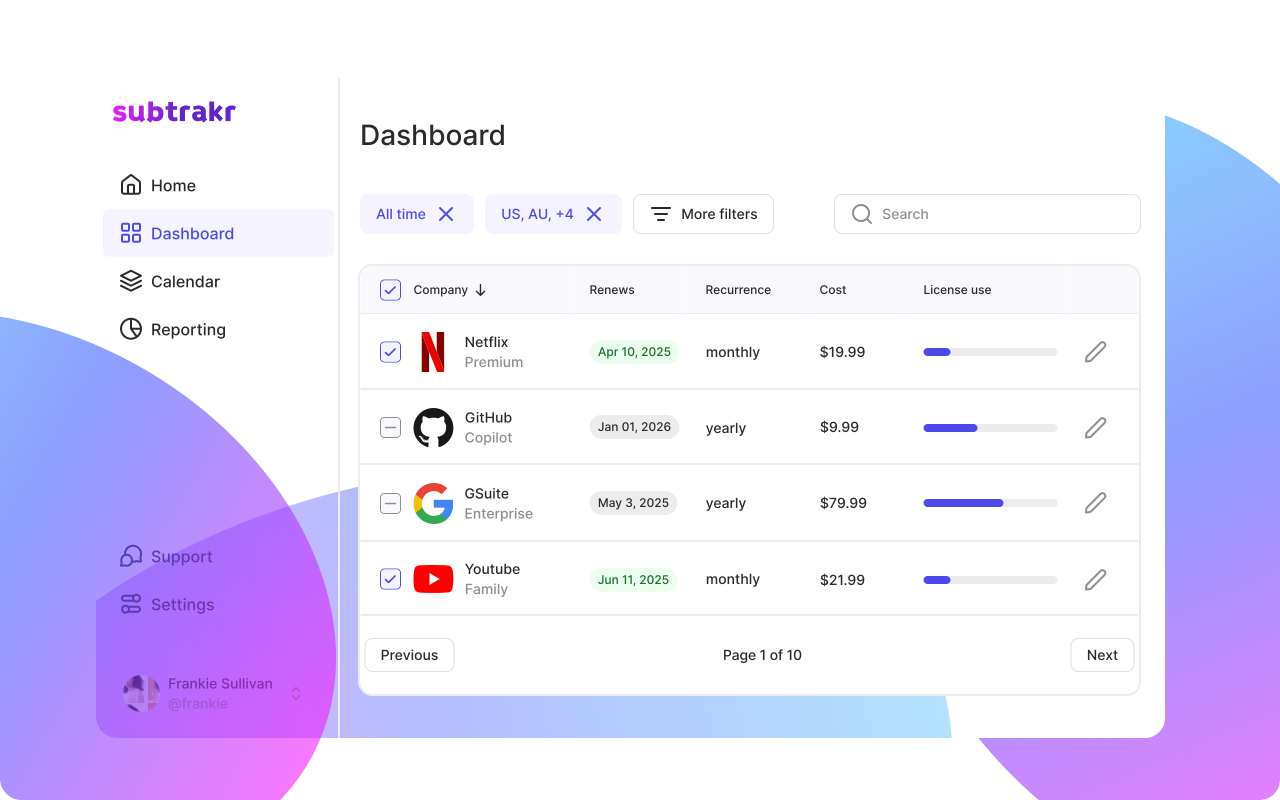
What it is: Subtrakr is a newcomer to the scene that's currently in early access (meaning it's still building out features and gathering feedback). It's all about giving you full visibility into all your recurring payments – especially software subscriptions and services – and helping you manage them in an organized way. If you're someone with dozens of digital subscriptions (think design tools, web services, SaaS products) or you run a small business with many recurring expenses, Subtrakr aims to be your central command center. The focus here is less on broad budgeting and more on inventorying and optimizing your subscriptions. It's like a supercharged subscription tracker with a business-friendly twist.
How it works: Currently, Subtrakr lets you input or import all your recurring expenses into one dashboard. This can include anything with a renewal – from software and app subscriptions to utilities, insurance policies, domain renewals, you name it. You can then organize these with tags (for example, tag some as "Work", "Personal", "Marketing tool", etc.) for easy filtering. The app includes a Calendar View that plots renewals on a monthly calendar, and it sends reminders before renewals or payments are due, so you'll never be caught by a surprise annual charge on your credit card. Subtrakr doesn't yet negotiate bills, but it's planning some smart cost-cutting features: the team is working on AI-powered insights to suggest cheaper alternatives for your subscriptions and highlight where you could save. Essentially, Subtrakr is positioning itself as the tool to stop overpaying for unused or overpriced subscriptions and keep all your recurring costs transparent.
Key Features (current and planned):
Central Subscription Dashboard: You get a clear dashboard listing all your recurring payments (with amounts, next due dates, etc.). It's comprehensive – one place to track software licenses, streaming services, gym memberships, cloud services, even payroll or rent if those are recurring. No more combing through bank statements; it's all visible at a glance.
Organization via Tags: Unlike some apps that just list subscriptions, Subtrakr lets you group and categorize them in a way that makes sense to you. For example, small businesses can separate expenses by department or project, or you could tag which subscriptions are personal vs. work-related. This is super helpful when you have many subscriptions and want to filter down to just "software" or just "entertainment" etc.
Renewal Alerts and Calendar: Subtrakr sends smart notifications before a payment or renewal hits. So if you have an annual domain renewal next week, it will ping you in advance. There's also a Calendar View that plots all your upcoming charges on a monthly calendar with a running cost total, which is great for planning and avoiding "oh no, Adobe Creative Cloud auto-renewed yesterday!" moments.
Multi-Currency & Multi-User (coming soon): The platform is building support for tracking expenses in different currencies (handy if you're paying some vendors in USD, others in EUR, etc.), and a multi-user collaboration feature. The latter means you could invite team members or your spouse to contribute/manage the recurring expenses together in one account – keeping everyone on the same page about what's being paid.
AI Cost Optimization (coming soon): This is on the roadmap – Subtrakr plans to use AI to analyze your recurring expenses and suggest better deals or alternatives. For instance, if you're paying for two similar software tools, it might flag redundancy, or if there's a cheaper plan available for a service you use, it could alert you. This "Cut Unnecessary Costs" feature isn't live yet (as of early access), but it shows the app's goal of not just tracking, but actively optimizing your subscriptions.
Pros:
Full Visibility = No More Surprises: Subtrakr is extremely useful if you have a ton of subscriptions and worry about losing track. It shines a light on "hidden" or forgotten recurring charges so you can cancel what you don't need and avoid those "oops, I've been paying for that?" moments. As the makers put it, people often pay for things they no longer use – Subtrakr helps uncover those hidden costs and stop the waste.
Organizational Superpowers: The ability to categorize and tag recurring expenses in custom ways is a standout feature. For power users or small businesses, this level of organization is a godsend. You can see exactly where your money is going – e.g., how much you spend on "developer tools" across different services – and identify overlaps or priorities.
Great for Software and Business Subscriptions: Subtrakr is positioning itself for folks who have lots of software subscriptions (think freelancers, entrepreneurs, startups). It's built with that use-case in mind, whereas many personal finance apps are more about household budgets. If you're trying to manage recurring software or SaaS spend, Subtrakr speaks your language and gives you more control and detail in that realm.
Early Access Perks: During early access, the developers are actively listening to user feedback. As a user, you can often influence the product's direction and get new features quickly. Also, early access likely means free or low-cost access at the moment (pricing hasn't been formally announced as it's still in beta). It's a chance to try a promising tool before it potentially becomes big. Early adopters have been quite positive, noting the simple interface and how it ensures they never miss a due date.
No Bloat, Just Focus: The app is very focused on recurring expenses. It's not trying to show you your net worth or be a stock tracker or anything. That means the interface is clean and straightforward – ideal if your main concern is "what subscriptions am I paying for and when do they renew?"
Cons:
Early Access Limitations: As an early access product, Subtrakr is still evolving. Not all features are live yet (e.g., the AI cost-cutting, multi-user support are marked "Coming soon"). There may be occasional bugs or missing integrations. If you need a fully mature solution today, Subtrakr might feel a bit green in parts.
Manual Input (for now): It's not entirely clear how much Subtrakr automates the detection of subscriptions from your bank feeds at this stage. It might require you to manually enter your subscriptions or upload invoices, especially since it's designed to track even things like insurance and payroll that might not come from a single bank transaction. This could be a bit of work initially if you have many recurring expenses. Automated bank syncing may be in the works, but early on, expect some setup effort.
No Bill Negotiation or Cancellation Service (yet): Unlike Rocket Money or Trim, Subtrakr doesn't negotiate bills or cancel stuff for you. It's more about visibility and alerts. You'll still have to do the actual cancelling or call to negotiate a better rate yourself. The app might suggest it (in the future) but won't do it for you at this time.
Undefined Pricing Model: Because it's in early access, it's not fully clear what Subtrakr will charge in the future. Right now it might be free or freemium to attract users, but eventually there could be a subscription or tiered pricing. There's a little uncertainty there. As an early user, you might get a great deal grandfathered in, or the model could change.
Potential Overlap with Other Tools: If you already use a budgeting app that tracks subscriptions, Subtrakr could feel like an extra step unless you really need the advanced organization. Some finance apps or even your bank might give basic recurring transaction lists. Subtrakr's challenge will be proving it adds enough value beyond what's built into those platforms, especially for purely personal (not business) use.
Pricing: During early access, Subtrakr is free to try (you can sign up on their website for the tracker). They haven't published official pricing yet – early adopters are essentially beta testing the service. It's likely Subtrakr will adopt a subscription-based model or freemium model in the future, but specifics are TBD. The company's messaging emphasizes that they found existing tools "too expensive," so we can hope they keep it affordable. For now, if you're interested in what Subtrakr offers, you can jump in as an early user at little to no cost. Just remember it's a "rising star" still under development.
Conclusion: Choosing the Right App for Your Needs
All of these apps can help you tame the nightmare of recurring expenses – but which one is best for you depends on what you're looking for:
If you want a little of everything in one app: go with Rocket Money (Truebill). It's great for finding and canceling subscriptions, automatically negotiating bills, and keeping a basic budget overview. Essentially, it's for those who say, "Please just handle it for me – and show me my spending in one place." You'll save money and get some budgeting help without much effort. Just be prepared to pay a small subscription for the premium perks if you want full service.
If hardcore budgeting and taking control is your goal: YNAB is the champ. Choose YNAB if you're ready to be hands-on and truly want to transform your financial habits. It doesn't directly lower bills, but it will absolutely help you plan for every recurring expense and stop living paycheck-to-paycheck. It's ideal for planners and those willing to put in time now to reap big savings later. The cost is higher, but for many, the financial peace of mind and savings gained through better budgeting make it worth it.
If you're all about free and simple tracking: Mint was the long-time favorite, and if it weren't being discontinued, it'd still be top of this list for a free solution. It's (hopefully) going to live on in some form via Credit Karma's app – so a free aggregator with subscription tracking will still exist. If you don't need fancy negotiation services and just want to see your accounts, budgets, and subscriptions in one free app, Intuit's Credit Karma (Mint's successor) could be your pick. Keep an eye on that transition.
If your main focus is slashing bills and you don't care about budgeting UIs: try Trim. It's the best option if you hate negotiating or cancelling things and just want someone to do it on a contingency fee basis. You won't get a pretty app or detailed spending charts, but you might save a bunch on your cable/internet and purge those random subscriptions via text message. Trim is like calling in a specialist for expense-cutting – great for a one-time tune-up of your bills or ongoing bill monitoring, and it won't cost you unless it works.
If you're a small business owner, freelancer, or power user drowning in subscriptions: keep an eye on Subtrakr. It's still new, but it shows a lot of promise for giving you granular control and insight into recurring software and service costs. Early users love the visibility it provides. As it develops, it could become the go-to for managing SaaS and other subscriptions that typical budgeting apps don't handle well. For now, it's worth trying out (especially since it's in early access and likely free) if you have complex subscription management needs and want to be ahead of the curve.
In the end, the "best" app is the one you'll actually use. All the fancy features in the world don't help if you ignore the app. So think about your personality: Do you want to set it and forget it, with the app doing the work (Rocket Money/Trim)? Or do you prefer to dive into the details and manually control things (YNAB/Subtrakr)? Or maybe you just want a reliable overview without spending money on an app (Mint/Credit Karma).
Perhaps even a combination could work – for example, use YNAB for budgeting but Trim to negotiate bills once a year. There's no rule you must pick only one. The good news is, each of these tools can save you money and reduce financial stress in its own way. Try one or two out, see which interface and approach you like, and soon you'll be on top of your recurring expenses instead of the other way around. Happy saving! 🥳